Онлайн-редактор субтитров
для создателей, которым важны тайминг и стиль
Создавайте, редактируйте и стилизуйте субтитры прямо в браузере. Загрузите видео или файл субтитров, исправьте тайминг и текст на таймлайне, переведите на другие языки и экспортируйте в SRT, ASS или как видео с вшитыми субтитрами — всё в одном месте.
Почему стоит использовать онлайн-редактор субтитров, а не ручные инструменты?
Субтитры — это больше, чем просто текстовые файлы. Им нужны точный тайминг, читаемые строки, единый стиль и часто несколько языковых версий. Специализированный редактор объединяет видео, таймлайн и текст — так вы быстрее завершаете работу и публикуете более качественные субтитры.
⏱ Визуально исправляйте тайминг
Сразу замечайте наложения, пустые интервалы и слишком быстрые строки, когда работаете рядом с видео и таймлайном.
📝 Редактируйте текст в контексте
Переписывайте строки, пока воспроизводится нужная сцена — так тон, ритм и смысл остаются согласованными.
🎨 Стилизуйте и экспортируйте в разные форматы
Настраивайте шрифты, цвета, размеры и положение. Экспортируйте в SRT/ASS или как финальное видео с вшитыми субтитрами.
What makes Subvideo “Studio-like”
Вам больше не нужно переключаться между приложениями. Проверяйте и дорабатывайте субтитры в одном пространстве: структурированная таблица, блоки на таймлайне, просмотр видео с оверлеем и экспорт в форматах, которые подходят для реальных платформ.
Built for modern workflows
Создатели контента, преподаватели и команды следуют одному рабочему процессу: создать или импортировать → поправить тайминг → улучшить текст → настроить стиль спикеров → экспортировать. Без хрупких переходов между файлами и без сломанных версий.
Как работает онлайн-редактор субтитров Subvideo.ai
Вы можете начать с нуля, с файла SRT/ASS или с автоматически созданной ИИ-транскрипции. Редактор объединяет управление таймлайном, редактирование текста и стилизацию в одном рабочем процессе.
Загрузите видео или файл субтитров
Перетащите файл MP4/MOV и т. п. или импортируйте файл SRT/ASS. Если вы начинаете с видео, субтитры могут быть сгенерированы с помощью ИИ-распознавания речи.
Редактируйте строки в структурированной таблице
У каждой строки есть время начала, время окончания, текст и информация о спикере. Редактируйте прямо в таблице и сразу видьте изменения во время воспроизведения.
Настраивайте тайминг и ритм на таймлайне
Перемещайте, удлиняйте или укорачивайте субтитры, объединяйте или делите строки, чтобы сохранить читаемость — особенно на мобильных устройствах.
Переводите субтитры на другие языки
Переводите прямо в редакторе и экспортируйте разные языковые версии отдельными файлами.
Применяйте стили и пресеты
Выбирайте шрифты, цвета, размеры и расположение — или используйте пресеты, такие как “YouTube Style” или “Cinema Style”, чтобы сохранить единый стиль.
Экспортируйте в SRT, ASS или как видео с вшитыми субтитрами
Экспортируйте файл субтитров (SRT/ASS) или финальное видео, в котором субтитры уже встроены в изображение.
Ключевые возможности редактора субтитров Subvideo.ai
Полноценная студия субтитров в браузере — а не просто текстовое поле. Создана для точного тайминга, читаемости, стиля и надёжного экспорта.
Редактирование по таймлайну
Сразу видно, как субтитры соответствуют ритму видео, и можно исправлять тайминг без догадок.
Генерация субтитров с помощью ИИ
Начинайте быстрее: создавайте субтитры из видео, а затем вручную доводите их до естественного результата.
Стили по спикерам (ASS)
Настраивайте для каждого спикера шрифт, цвет, размер и позицию, чтобы каждая реплика оставалась узнаваемой и единообразной.
Экспорт для любых платформ
Экспортируйте в SRT для максимальной совместимости, в ASS для расширенного стиля или как видео с вшитыми субтитрами.
Рабочий процесс под реальные форматы
Импортируйте и дорабатывайте файлы SRT/ASS (а также распространённые видео- и аудиоформаты), сохраняя проект готовым к экспорту. Идеально, если у вас уже есть субтитры, но им нужен профессиональный тайминг и качественная доработка.
Сделано для реальных зрителей
Субтитры должны быть не просто “технически правильными”, а удобными для чтения. Редактор помогает именно в том, что важнее всего: сокращать слишком длинные строки, разбивать быстрые реплики, избегать наложений и сохранять правильный ритм.
Онлайн-редактор vs ручные рабочие процессы
Настольные инструменты могут быть мощными — но многие процессы ломаются, потому что тайминг, перевод и экспорт разбросаны между несколькими приложениями и файлами. Эта страница создана для того, чтобы завершать всё в одном месте.
| Тема рабочего процесса | Ручной / файлоориентированный процесс | Онлайн-редактор субтитров Subvideo.ai |
|---|---|---|
|
Исправление тайминга с контекстом Наложения, пустые интервалы, слишком быстрые строки |
Зависит от ситуации — часто это “проверяй и смотри” | Да — видео + таблица + таймлайн в одном окне |
|
Единообразие Одинаковый стиль между эпизодами |
Сложно — настройка повторяется каждый раз | Да — пресеты + стили спикеров |
|
Переводы Многоязычные версии |
Вручную — циклы экспорта/импорта | Да — перевод и экспорт языковых версий |
|
Надёжность экспорта SRT / ASS / вшитые субтитры |
Смешанный — проблемы на границах форматов | Да — поддержка SRT, ASS и вшитого видео |
| Установка и старт | Нужна установка + настройка | Установка не нужна — открыть и начать |
Для кого этот онлайн-редактор субтитров?
Для всех, кому важно, как субтитры реально выглядят и работают в видео, а не только как выглядит исходный текстовый файл.
🎥 Видеокреаторы и монтажёры
Очищайте автоматически созданные субтитры, корректируйте тайминг и экспортируйте аккуратный результат для YouTube, Shorts, TikTok или Vimeo.
🎓 Преподаватели и авторы курсов
Редактируйте субтитры для уроков и курсов, а затем экспортируйте многоязычные версии для доступности и лучшего понимания.
🏢 Команды и агентства
Централизуйте работу с субтитрами в общем браузерном инструменте вместо того, чтобы разбираться с настольными приложениями и несогласованными файлами.
Посмотрите редактор субтитров в действии
Откройте проект в браузере, исправьте текст и время показа субтитров, проверьте видео и экспортируйте результат в нужном формате.
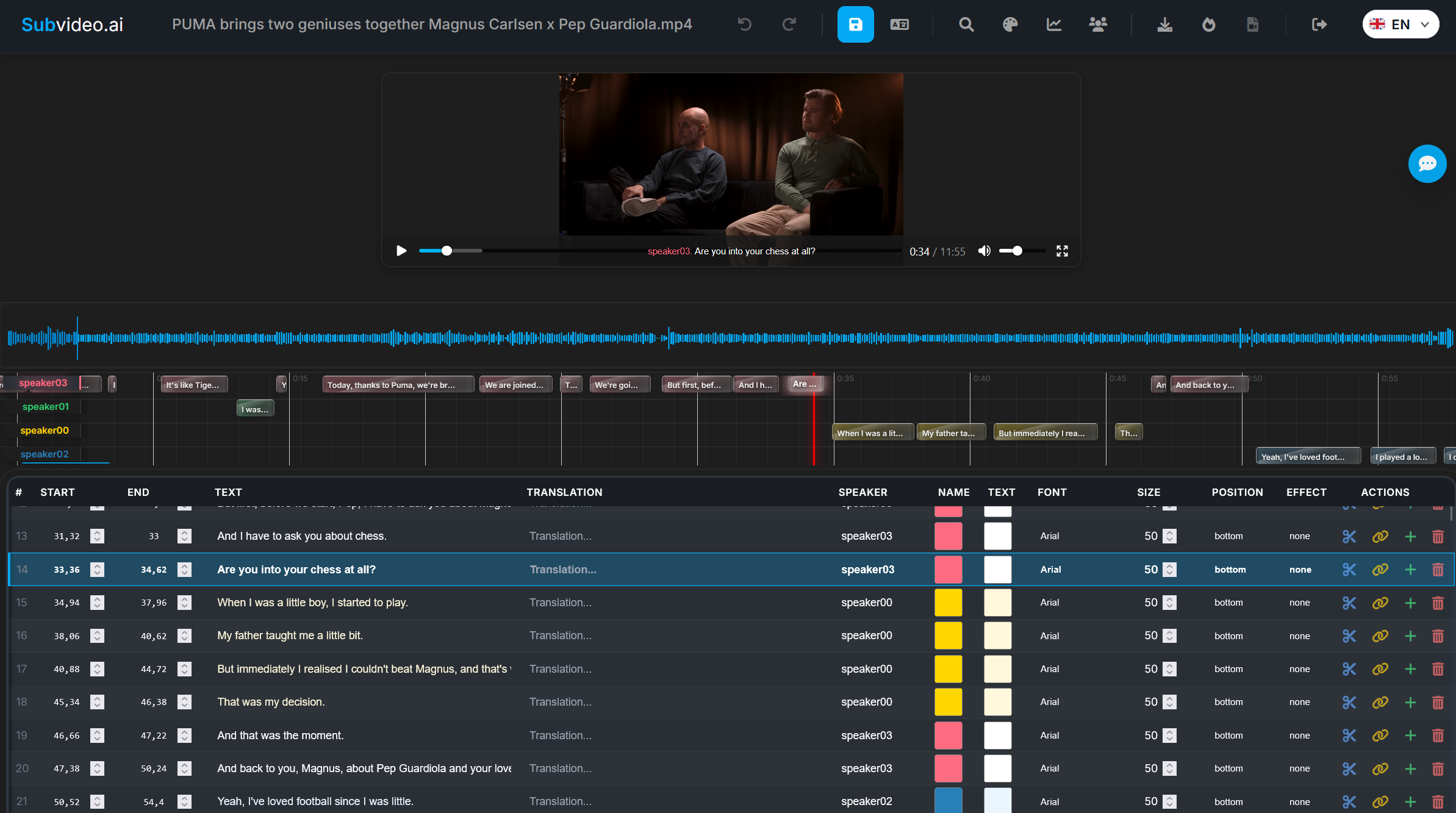
Попробуйте онлайн-редактор субтитров со своим файлом
Загрузите видео или файл субтитров. После завершения обработки вы перейдёте в редактор, где сможете доработать тайминг, переводы и стили.
FAQ: онлайн-редактор субтитров
Короткие ответы о форматах, экспорте и рабочем процессе.
Какие форматы можно редактировать?
Вы можете редактировать субтитры, созданные в Subvideo.ai, а также импортировать стандартные форматы, например SRT или ASS, и дорабатывать их в редакторе.
Нужно ли что-то устанавливать?
Нет. Редактор субтитров полностью работает в браузере. Загрузите видео или файл субтитров и сразу начинайте.
Можно ли работать с несколькими языками?
Да. Вы можете переводить субтитры и экспортировать языковые версии отдельными файлами.
Можно ли экспортировать видео с вшитыми субтитрами?
Да. Помимо SRT/ASS, вы можете экспортировать hardcoded-видео, в котором субтитры уже встроены в изображение.
Как обрабатываются мои данные?
Файлы обрабатываются на защищённых серверах и хранятся только ограниченное время, необходимое для редактирования и скачивания, после чего удаляются в соответствии с правилами хранения.
Редактор подходит профессионалам или новичкам?
И тем, и другим. Новички получают понятный пошаговый процесс, а профессионалы — таймлайн-редактирование, стилизацию и экспорт без настольной установки.
Готовы к субтитрам, которые действительно выглядят завершёнными?
Загрузите файл, доработайте тайминг и текст, настройте стили спикеров и экспортируйте в SRT/ASS или как MP4 с вшитыми субтитрами — всё в одном рабочем процессе.