Guest
Free
- 1 upload per day
- Simple standard style.
- Edit subtitle text and timing.
- SRT/TXT text files; ASS with permitted styling.
Automatically create subtitles, edit timing and text directly in your browser, translate into other languages and export SRT, ASS or burned-in video in one workflow.

Drag & drop positioning

Translate subtitles into an available target language, then review the result.

Short-form content

Burn subtitles into video

Quick Edit

TikTok & more

Subtitle studio

Speaker recognition

Timeline view
 HTTPS
HTTPS HTTPS transport
 No account needed
See how Subvideo.ai fits into your specific workflow.
Hook your audience with animated Hormozi-style text, emojis and bold colors. Export directly for TikTok, Reels and Shorts — without manual keyframing.
Turn podcast audio into subtitles, review the text and timing, then export.
Create ASS or SRT subtitles and edit imported subtitle documents.
Transcribe, translate and create voiceovers in the languages offered by the relevant workflow.
Choose a supported video or audio file and start subtitle processing.
Keep your own copies of media and exports. Guest access depends on your browser session.
Your guest limit for today has been reached. With a free account, you can upload up to 3 files per day.
Adopted projects may already count towards your account allowance. This does not mean three additional or immediately available uploads.
Only the explicitly selected project and its saved changes will be adopted. Save edits in other tabs and back up other guest projects before switching accounts.
A guest project is not yet ready for safe adoption. Open the dashboard first and finish editing or processing. Nothing is transferred now.
After switching accounts, you can start another upload in the dashboard if your allowance permits. The local file selected here will not be sent automatically; select it again there.
HTTPSHTTPS transportNo account neededAudio example · EN
Test version: 29 September 2026 · Short read speech; no general accuracy or timing guarantee.
Unchanged automatic output
Create subtitles, edit text and timing, translate and export in your browser.
Generate subtitles from audio or video, then review the text and timing.
Edit visually, style subtitles and sync them with audio — like in Premiere or Final Cut.
Ultimate: burn-in from the dashboard and editor exports without the free watermark. Free editor exports with a watermark remain available. A video file is required.
Edit text, fonts, colors, speaker tags and more — line by line.
Translate subtitles into an available target language, then review the result.
SRT, ASS, VTT, SBV and TXT are also available for free. Ultimate is not required just to download a subtitle file.
Create subtitles without an account. A free account offers three uploads per day.
Detect speakers automatically and assign styles per person.
Review text and timing
AI audio enhancement for media uploads.
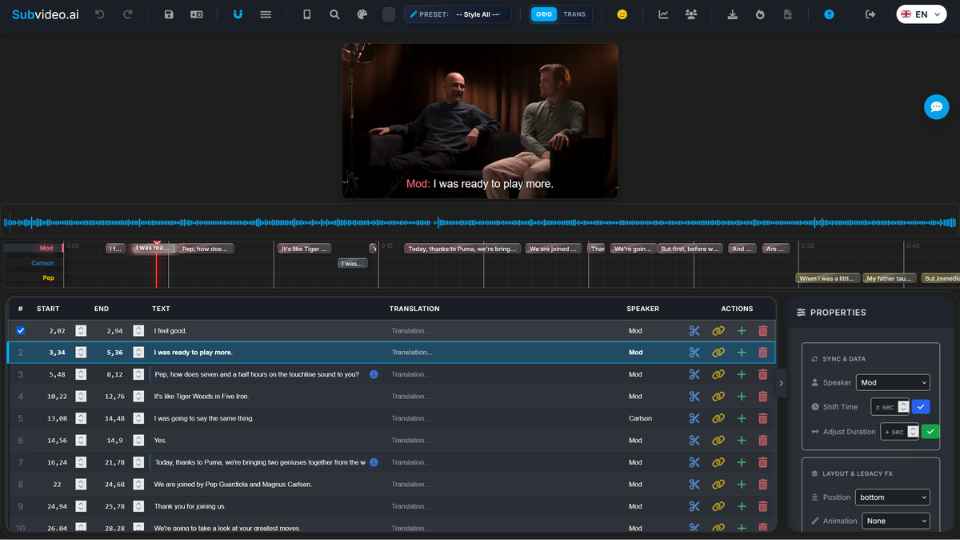
Edit text, assign speakers, translate and style subtitles — export as SRT/ASS or burn them into your video.

Choose a voice, adjust speed and pitch, and export it as an audio track or a finished video.

Create subtitles, edit text and timing, translate and export in your browser.
Translate subtitles into an available target language, then review the result.
ASS preserves supported fonts, colors and positioning for styled subtitles. SRT is a text-and-timing format; ASS is not a finished MP4.
Your files are processed securely. For subtitle translations, local models are used where available; otherwise subtitle text may be processed through the Google Translate API.
Create subtitles, edit text and timing, translate and export in your browser.
Choose a supported video or audio file and start subtitle processing.
Generate subtitles from audio or video, then review the text and timing.
Ultimate: burn-in from the dashboard and editor exports without the free watermark. Free editor exports with a watermark remain available. A video file is required.






Start free. Choose Ultimate for the complete design library and custom styling.
Free
Free
USD 9.99/month · renews monthly
Cancel through your account via Stripe or PayPal.
Or USD 15 for 30 days · one-time payment, no renewal
Free account: Standard, Aesthetic Dark and Fire Beast. ASS is not Ultimate-only; SRT contains text and timing, not styling.
Video export requires a video file; free video exports include a watermark. Timed outputs require valid subtitle times.
Other formats depend on the editor and project. ASS is not an MP4 and does not unlock additional designs. Technical limits apply to every plan.
Create subtitles, edit text and timing, translate and export in your browser.
Generate subtitles from audio or video, then review the text and timing.
Edit visually, style subtitles and sync them with audio — like in Premiere or Final Cut.
Ultimate: burn-in from the dashboard and editor exports without the free watermark. Free editor exports with a watermark remain available. A video file is required.
Edit text, fonts, colors, speaker tags and more — line by line.
Transcribe, translate and create voiceovers in the languages offered by the relevant workflow.
SRT, ASS, VTT, SBV and TXT are also available for free. Ultimate is not required just to download a subtitle file.
Keep your own copies of media and exports. Guest access depends on your browser session.
Detect speakers automatically and assign styles per person.
Check wording, line breaks and timecodes in the editor before export.
Choose from the voices and languages available in the voiceover workflow.
Use subtitle start and end times to prepare the voiceover, then review its timing with the video.
Adjust the available voice, speed and pitch settings.
Export as a separate audio track — or directly as a rendered video with voiceover.
Correct names and technical terms in the subtitle text before generating the voiceover.
Noise reduction and leveling — for clean, clear output.
Available exports depend on the editor and project type. Burn-in requires a video; a subtitle document alone does not contain a media track.
In Studio, media projects and timed subtitle documents can also be exported as DOCX, JSON, CSV and HTML transcripts, without Ultimate. TXT drafts require confirmation of the suggested timings first.






Built for professionals — yet easy for everyone to use. Full control over every aspect of your subtitles:
Ultimate: the complete design library and supported font, color, background and effect adjustments.
Edit subtitles visually, align them with audio, cut segments or merge lines — without technical know-how.
Ultimate: burn-in from the dashboard and editor exports without the free watermark. Free editor exports with a watermark remain available. A video file is required.
All answers at a glance — no expanding required.
File-size and technical processing limits apply to every plan.
File-size, document and technical processing limits still apply to every plan.
Connections to Subvideo.ai use HTTPS to encrypt data in transit. See the privacy notice for information about processing and retention.
We support MP3, M4A, WAV, OGG, OPUS as well as MP4, MOV, MKV, AVI, WEBM and other common formats.
SRT, ASS, VTT, SBV and TXT are also available for free. Ultimate is not required just to download a subtitle file.
Transcribe, translate and create voiceovers in the languages offered by the relevant workflow.
Recording quality affects recognition. Review the result; audio optimization is an optional upload setting.
Enable speaker recognition and review the speaker assignments in the editor.
Transcribe, translate and create voiceovers in the languages offered by the relevant workflow.
Processing time depends on the file and current workload.
Anytime in your account settings under “Manage subscription”. Access remains active until the end of the current billing period.
A small team with a big passion for audio and video. We combine strong AI models with a studio that genuinely saves time in everyday workflows.
Visit the help center or contact us through the contact page — we will get back to you as soon as possible.
Use Subvideo.ai for client subtitle projects, video production workflows and course captions.
Create subtitles, edit text and timing, translate and export in your browser.