Online Subtitle Editor
for creators who care about timing & style
Create, edit, and style subtitles right in your browser. Upload a video or subtitle file, fix timing and text on a timeline, translate into other languages, and export SRT, ASS, or a hardcoded subtitle video — all in one place.
Why an online subtitle editor (instead of manual tools)?
Subtitles are more than text files. They need accurate timing, readable line lengths, consistent styling, and often multiple language versions. A dedicated subtitle editor keeps video, timeline, and text together — so you finish faster and publish better subtitles.
⏱ Fix timing visually
Spot overlaps, gaps, and too-fast lines instantly when you work next to the video and timeline.
📝 Edit text in context
Rewrite while the right scene plays — so tone, pace, and meaning stay in sync.
🎨 Style and export to multiple formats
Control fonts, colors, sizes, and positions. Export SRT/ASS or a finished hardcoded subtitle video.
What makes Subvideo “Studio-like”
You don’t switch between apps. You review and refine subtitles in one place: a structured subtitle table, timeline blocks, video playback, and overlay — plus exports that match real platform requirements.
Built for modern workflows
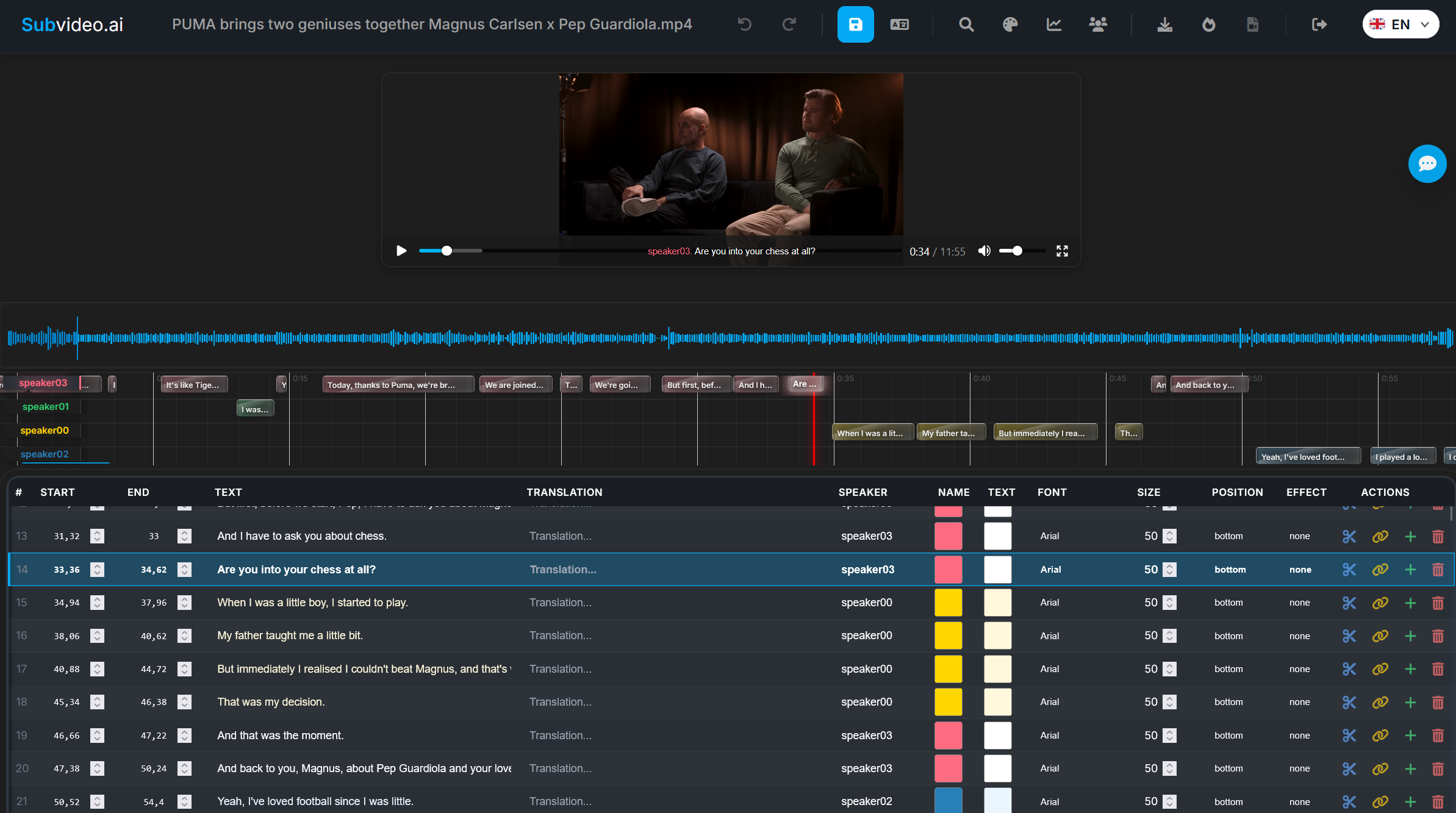
Creators, educators, and teams follow one workflow: generate or import → fix timing → polish text → style speakers → export. No fragile file juggling. No broken versions.
How the Subvideo.ai online subtitle editor works
Start from scratch, from an SRT/ASS file, or from automatic AI transcription. The editor combines timeline control, text editing, and styling in one workflow.
Upload video or subtitle file
Drag & drop MP4/MOV/etc. or upload SRT/ASS. If you start from a video, subtitles can be generated via AI speech recognition.
Edit lines in a structured table
Each line has a start time, end time, text, and speaker info. Edit inline — changes appear immediately in playback.
Adjust timing & pace on the timeline
Move, extend, or shorten subtitles; split or merge lines to keep them readable — especially on mobile.
Translate subtitles into other languages
Translate directly inside the editor and export language versions as separate subtitle files.
Apply styles and presets
Choose fonts, colors, sizes, and positions — or use presets like “YouTube Style” or “Cinema Style” for consistency.
Export SRT, ASS, or hardcoded subtitle video
Export a subtitle file (SRT/ASS) or a finished video with subtitles burned into the image (burn-in).
Key features of the Subvideo.ai subtitle editor
A full subtitle studio in your browser — not just a basic text field. Built for timing, readability, styling, and reliable exports.
Timeline-based editing
See how subtitles align with the video’s pacing at a glance and fix timing without guessing.
AI subtitle generation
Start fast: generate subtitles from video, then refine manually until they feel natural.
Speaker styling (ASS)
Set styles per speaker (font, color, size, position) for a consistent “brand look”.
Export for any platform
Export SRT for maximum compatibility, ASS for advanced styling, or a hardcoded subtitle video.
Format-friendly workflow
Import and refine SRT/ASS (and common video/audio formats) and keep projects export-ready. Ideal when you already have subtitles, but they need professional timing and polish.
Designed for real viewers
Subtitles should be readable, not just “technically correct”. The editor supports the common fixes: shorten long lines, split fast dialogue, avoid overlaps, keep rhythm.
Online editor vs. manual workflows
Desktop tools can be powerful — but many workflows break because timing, translation, and exports are spread across multiple apps and files. This page is built around finishing the job in one place.
| Workflow topic | Manual / file juggling | subvideo.ai online subtitle editor |
|---|---|---|
|
Timing fixes with context Overlaps, gaps, too-fast lines |
Depends — often “guess & preview” | Yes — video + table + timeline in one view |
|
Consistency Styles across episodes |
Hard — repeated setup | Yes — presets + speaker styles |
|
Translations Multiple language versions |
Manual — export/import loops | Yes — translate and export versions |
|
Export reliability SRT/ASS/Hardcoded |
Mixed — format edge cases | Yes — SRT, ASS and hardcoded video |
| Setup & onboarding | Needs install + config | No install — open and start |
Who uses the online subtitle editor?
Anyone who cares about how subtitles actually look and feel in a video — not just the raw text file.
🎥 Video creators & editors
Clean up auto-generated subtitles, adjust timing, and export polished subtitles for platforms like YouTube, Shorts, TikTok, or Vimeo.
🎓 Educators & course creators
Edit subtitles for lectures and lessons, then export multi-language versions for accessibility and better comprehension.
🏢 Teams & agencies
Keep subtitle workflows in one shared, browser-based tool instead of juggling multiple desktop apps and inconsistent files.
See the subtitle editor in action
Add a short demo video or a clean screenshot of your editor UI here. This section converts well because visitors instantly understand the workflow.
Test the online subtitle editor with your file
Upload a video or subtitle file. Once processing is complete, you’ll be redirected into the editor to refine timing, translations, and styles.
FAQ: Online subtitle editor
Quick answers about formats, exports, and workflow.
Which formats can I edit?
You can edit subtitles created in Subvideo.ai, and upload standard formats like SRT or ASS to refine them inside the editor.
Do I need to install anything?
No. The subtitle editor runs fully in your browser. Upload a video or subtitle file and start immediately.
Can I work with multiple languages?
Yes. You can translate subtitles and export language versions as separate files.
Can I export a video with burned-in subtitles?
Yes. Besides SRT/ASS, you can export a hardcoded video where subtitles are burned into the image.
How is my data handled?
Files are processed on secure servers and stored only for a limited time for editing and downloading — then removed according to retention rules.
Is the editor for pros or beginners?
Both. Beginners benefit from a guided workflow; pros get timeline timing, styling, and exports without desktop setup.
Ready for subtitles that look truly “finished”?
Upload a file, refine timing + text, style speakers, and export SRT/ASS or a hardcoded MP4 — all in one workflow.