Online altyazı düzenleyici
zamanlama ve stile önem veren içerik üreticileri için
Altyazıları doğrudan tarayıcınızda oluşturun, düzenleyin ve stillendirin. Bir video veya altyazı dosyası yükleyin, zaman çizelgesinde zamanlamayı ve metni düzeltin, başka dillere çevirin ve SRT, ASS veya altyazı gömülü video olarak dışa aktarın — hepsi tek bir yerde.
Neden manuel araçlar yerine online altyazı düzenleyici kullanmalısınız?
Altyazılar yalnızca metin dosyalarından ibaret değildir. Doğru zamanlama, okunabilir satırlar, tutarlı stil ve çoğu zaman birden fazla dil sürümü gerekir. Özel bir düzenleyici, video, zaman çizelgesi ve metni bir arada tutar — böylece daha hızlı bitirir ve daha iyi altyazılar yayınlarsınız.
⏱ Zamanlamayı görsel olarak düzeltin
Video ve zaman çizelgesi yanında çalışırken çakışmaları, boşlukları ve çok hızlı satırları anında fark edin.
📝 Metni bağlam içinde düzenleyin
Doğru sahne oynarken metni yeniden yazın — böylece ton, ritim ve anlam uyumlu kalır.
🎨 Stillendirin ve birden fazla formatta dışa aktarın
Yazı tipi, renk, boyut ve konumu kontrol edin. SRT/ASS veya altyazı gömülü final video olarak dışa aktarın.
What makes Subvideo “Studio-like”
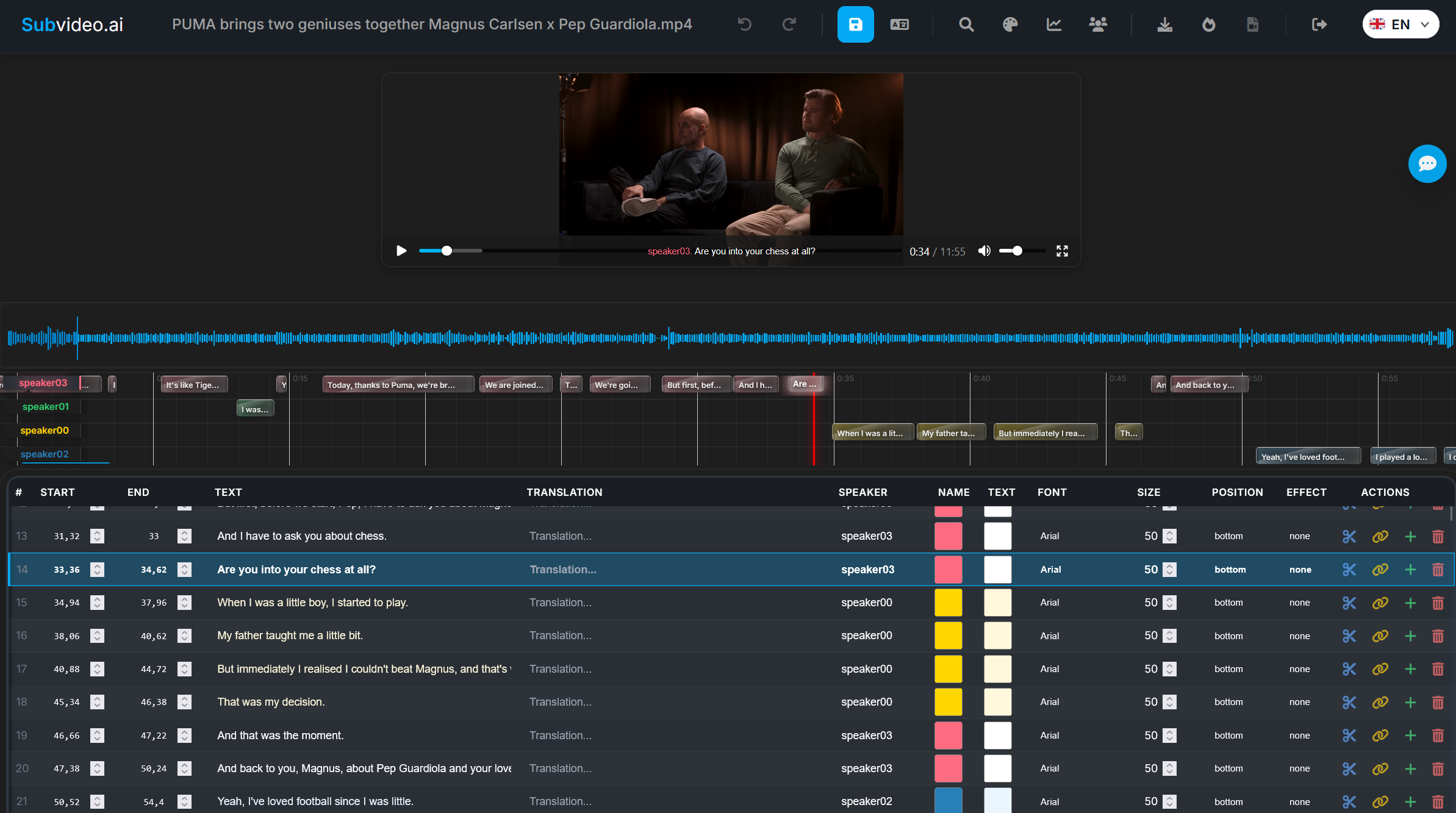
Artık uygulamalar arasında gidip gelmenize gerek yok. Altyazıları tek bir alanda gözden geçirip iyileştirin: yapılandırılmış tablo, zaman çizelgesi blokları, video oynatma ve overlay önizleme ile gerçek platform gereksinimlerine uygun dışa aktarımlar.
Built for modern workflows
İçerik üreticileri, eğitmenler ve ekipler tek bir akışı takip eder: oluştur veya içe aktar → zamanlamayı düzelt → metni iyileştir → konuşmacı stillerini ayarla → dışa aktar. Kırılgan dosya geçişleri yok. Bozulan sürümler yok.
Subvideo.ai online altyazı düzenleyici nasıl çalışır?
Sıfırdan başlayabilir, bir SRT/ASS dosyasıyla çalışabilir veya yapay zekâ tarafından otomatik oluşturulmuş bir dökümden devam edebilirsiniz. Düzenleyici; zaman çizelgesi kontrolü, metin düzenleme ve stillendirmeyi tek bir iş akışında birleştirir.
Bir video veya altyazı dosyası yükleyin
MP4/MOV vb. bir dosyayı sürükleyip bırakın ya da bir SRT/ASS dosyası içe aktarın. Videodan başlarsanız, altyazılar yapay zekâ konuşma tanıma ile üretilebilir.
Yapılandırılmış tabloda satırları düzenleyin
Her satırın başlangıç saati, bitiş saati, metni ve konuşmacı bilgisi vardır. Satır içi düzenleme yapın ve değişiklikleri oynatma sırasında hemen görün.
Zaman çizelgesinde zamanlama ve ritmi ayarlayın
Altyazıları taşıyın, uzatın veya kısaltın; okunabilirliği korumak için satırları birleştirin veya bölün — özellikle mobilde.
Altyazıları diğer dillere çevirin
Doğrudan düzenleyicide çevirin ve dil sürümlerini ayrı dosyalar olarak dışa aktarın.
Stiller ve hazır ayarlar uygulayın
Yazı tipleri, renkler, boyutlar ve konumlar seçin — veya tutarlılığı korumak için “YouTube Style” ya da “Cinema Style” gibi preset’leri kullanın.
SRT, ASS veya altyazı gömülü video olarak dışa aktarın
Bir altyazı dosyası (SRT/ASS) veya altyazıların görüntüye işlendiği final video dışa aktarın.
Subvideo.ai altyazı düzenleyicisinin temel özellikleri
Sadece basit bir metin alanı değil, tarayıcı içinde tam bir altyazı stüdyosu. Zamanlama, okunabilirlik, stil ve güvenilir dışa aktarma için tasarlanmıştır.
Zaman çizelgesi tabanlı düzenleme
Altyazıların videonun ritmiyle nasıl hizalandığını anında görün ve tahmine dayanmadan zamanlamayı düzeltin.
Yapay zekâ ile altyazı oluşturma
Hızlı başlayın: videodan altyazı üretin, ardından doğal hissedene kadar manuel olarak iyileştirin.
Konuşmacı bazlı stil (ASS)
Her sesin tutarlı ve ayırt edilebilir kalması için konuşmacı bazlı yazı tipi, renk, boyut ve konum belirleyin.
Her platform için dışa aktarma
Maksimum uyumluluk için SRT, gelişmiş stil için ASS veya altyazı gömülü video olarak dışa aktarın.
Gerçek formatlara uygun iş akışı
SRT/ASS dosyalarını (ve yaygın video/ses formatlarını) içe aktarın ve projeleri dışa aktarmaya hazır halde yeniden işleyin. Özellikle zaten altyazınız varsa ama profesyonel zamanlama ve iyi bir son dokunuş gerekiyorsa idealdir.
Gerçek izleyiciler için tasarlandı
Altyazılar yalnızca “teknik olarak doğru” olmamalı, aynı zamanda okunabilir de olmalıdır. Düzenleyici; uzun satırları kısaltma, hızlı konuşmaları bölme, çakışmaları önleme ve doğru ritmi koruma gibi en önemli iyileştirmelerde yardımcı olur.
Online düzenleyici vs manuel iş akışları
Masaüstü araçlar güçlü olabilir — ancak zamanlama, çeviri ve dışa aktarma birden fazla uygulama ve dosyaya dağılmışsa iş akışları kolayca bozulur. Bu sayfa, her şeyi tek yerde tamamlamak için tasarlandı.
| İş akışı konusu | Manuel / dosya ağırlıklı süreç | Subvideo.ai online altyazı düzenleyici |
|---|---|---|
|
Bağlamla birlikte zamanlama düzeltme Çakışmalar, boşluklar, çok hızlı satırlar |
Duruma göre — çoğu zaman “deneyip bakma” | Evet — video + tablo + zaman çizelgesi tek görünümde |
|
Tutarlılık Bölümler arasında aynı stil |
Zor — her seferinde tekrar ayar | Evet — preset’ler + konuşmacı stilleri |
|
Çeviriler Çok dilli sürümler |
Manuel — dışa aktar / içe aktar döngüleri | Evet — çevir ve dil sürümlerini dışa aktar |
|
Dışa aktarma güvenilirliği SRT / ASS / gömülü altyazı |
Karma — format sınırlarında sorunlar | Evet — SRT, ASS ve gömülü video desteği |
| Kurulum ve başlangıç | Kurulum gerekir + yapılandırma | Kurulum gerekmez — aç ve başla |
Bu online altyazı düzenleyiciyi kimler kullanır?
Sadece ham metin dosyasını değil, altyazıların videonun içinde nasıl göründüğünü ve nasıl çalıştığını önemseyen herkes için.
🎥 Video içerik üreticileri ve editörler
Otomatik oluşturulan altyazıları temizleyin, zamanlamayı düzeltin ve YouTube, Shorts, TikTok veya Vimeo için düzgün sonuçlar dışa aktarın.
🎓 Eğitmenler ve kurs üreticileri
Ders ve kurs altyazılarını düzenleyin, ardından erişilebilirlik ve daha iyi anlaşılırlık için çok dilli sürümler dışa aktarın.
🏢 Ekipler ve ajanslar
Masaüstü uygulamalar ve tutarsız dosyalarla uğraşmak yerine, altyazı iş akışlarını tarayıcı tabanlı ortak bir araçta merkezileştirin.
Altyazı düzenleyiciyi çalışırken görün
Projenizi tarayıcıda açın, altyazı metnini ve zamanlamasını düzeltin, video önizlemesini kontrol edin ve istediğiniz biçimde dışa aktarın.
Online altyazı düzenleyiciyi kendi dosyanızla deneyin
Bir video veya altyazı dosyası yükleyin. İşlem tamamlandığında, zamanlama, çeviriler ve stiller üzerinde çalışmak için düzenleyiciye yönlendirilirsiniz.
SSS: Online altyazı düzenleyici
Formatlar, dışa aktarma ve iş akışı hakkında hızlı yanıtlar.
Hangi formatları düzenleyebilirim?
Subvideo.ai içinde oluşturulan altyazıları düzenleyebilir ve SRT veya ASS gibi standart formatları içe aktararak editörde yeniden çalışabilirsiniz.
Bir şey kurmam gerekiyor mu?
Hayır. Altyazı düzenleyici tamamen tarayıcı içinde çalışır. Bir video veya altyazı dosyası yükleyin ve hemen başlayın.
Birden fazla dille çalışabilir miyim?
Evet. Altyazıları çevirebilir ve dil sürümlerini ayrı dosyalar olarak dışa aktarabilirsiniz.
Altyazı gömülü video dışa aktarabilir miyim?
Evet. SRT/ASS’in yanı sıra, altyazıların görüntüye işlendiği hardcoded bir video da dışa aktarabilirsiniz.
Verilerim nasıl işleniyor?
Dosyalar güvenli sunucularda işlenir ve yalnızca düzenleme ve indirme için gerekli sınırlı süre boyunca saklanır; ardından saklama kurallarına göre silinir.
Bu düzenleyici profesyoneller için mi yoksa yeni başlayanlar için mi?
Her ikisi için de. Yeni başlayanlar yönlendirmeli bir iş akışı elde ederken, profesyoneller zaman çizelgesi düzenleme, stillendirme ve masaüstü kurulum olmadan dışa aktarma özelliklerine sahip olur.
Gerçekten “bitmiş” görünen altyazılara hazır mısınız?
Bir dosya yükleyin, zamanlamayı ve metni iyileştirin, konuşmacı stillerini ayarlayın ve SRT/ASS veya altyazı gömülü MP4 olarak dışa aktarın — hepsi tek bir iş akışında.