Online-Untertitel-Editor
für Creator, die Wert auf Timing & Stil legen
Erstelle, bearbeite und gestalte Untertitel direkt in deinem Browser. Lade ein Video oder eine Untertiteldatei hoch, korrigiere Timing und Text auf einer Timeline, übersetze in andere Sprachen und exportiere SRT, ASS oder ein Video mit eingebrannten Untertiteln — alles an einem Ort.
Warum ein Online-Untertitel-Editor statt manueller Tools?
Untertitel sind mehr als nur Textdateien. Sie brauchen präzises Timing, gut lesbare Zeilenlängen, konsistentes Styling und oft mehrere Sprachversionen. Ein spezieller Untertitel-Editor hält Video, Timeline und Text zusammen — damit du schneller fertig wirst und bessere Untertitel veröffentlichst.
⏱ Timing visuell korrigieren
Erkenne Überlappungen, Lücken und zu schnelle Zeilen sofort, wenn du neben Video und Timeline arbeitest.
📝 Text im Kontext bearbeiten
Formuliere um, während die passende Szene läuft — so bleiben Ton, Tempo und Bedeutung im Einklang.
🎨 Stylen und in mehrere Formate exportieren
Steuere Schriftarten, Farben, Größen und Positionen. Exportiere SRT/ASS oder ein fertiges Video mit eingebrannten Untertiteln.
What makes Subvideo “Studio-like”
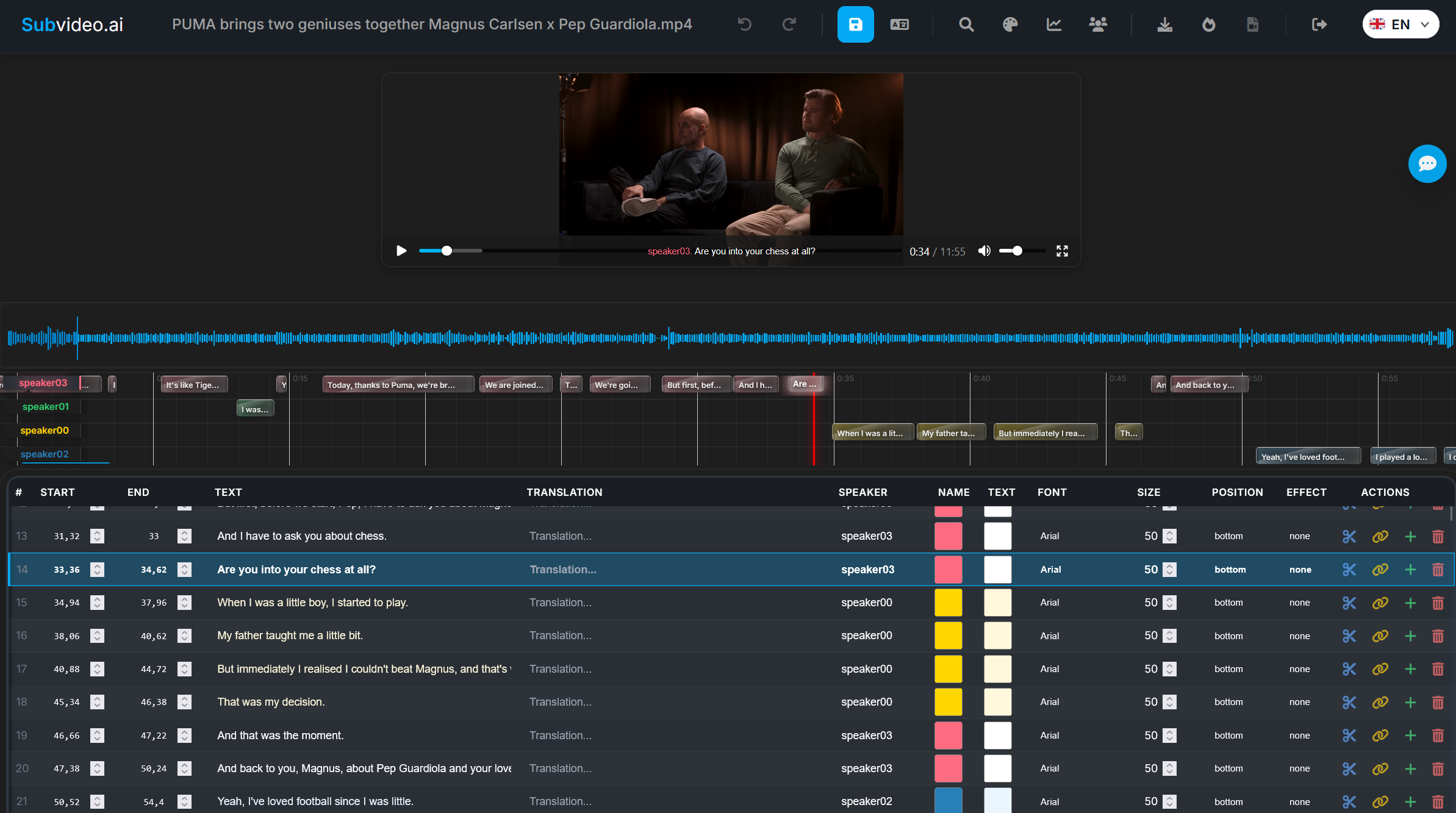
Du wechselst nicht zwischen mehreren Apps. Du prüfst und verfeinerst Untertitel an einem Ort: strukturierte Untertitel-Tabelle, Timeline-Blöcke, Videowiedergabe und Overlay — plus Exporte, die echten Plattformanforderungen entsprechen.
Built for modern workflows
Creator, Lehrende und Teams folgen einem Workflow: generieren oder importieren → Timing korrigieren → Text verfeinern → Sprecher stylen → exportieren. Kein fragiles Dateihopping. Keine kaputten Versionen.
So funktioniert der Online-Untertitel-Editor von Subvideo.ai
Starte von Grund auf, mit einer SRT/ASS-Datei oder mit automatischer KI-Transkription. Der Editor kombiniert Timeline-Kontrolle, Textbearbeitung und Styling in einem Workflow.
Video oder Untertiteldatei hochladen
Ziehe MP4/MOV usw. per Drag & Drop hinein oder lade SRT/ASS hoch. Wenn du mit einem Video startest, können Untertitel per KI-Spracherkennung erzeugt werden.
Zeilen in einer strukturierten Tabelle bearbeiten
Jede Zeile hat Startzeit, Endzeit, Text und Sprecherinfo. Bearbeite direkt inline — Änderungen erscheinen sofort in der Wiedergabe.
Timing & Lesefluss auf der Timeline anpassen
Verschiebe, verlängere oder verkürze Untertitel; teile oder verbinde Zeilen, damit sie gut lesbar bleiben — besonders auf Mobilgeräten.
Untertitel in andere Sprachen übersetzen
Übersetze direkt im Editor und exportiere Sprachversionen als separate Untertiteldateien.
Stile und Presets anwenden
Wähle Schriftarten, Farben, Größen und Positionen — oder nutze Presets wie „YouTube Style“ oder „Cinema Style“ für Konsistenz.
SRT, ASS oder Video mit eingebrannten Untertiteln exportieren
Exportiere eine Untertiteldatei (SRT/ASS) oder ein fertiges Video, in das die Untertitel direkt eingebrannt sind (Burn-In).
Wichtige Funktionen des Subvideo.ai-Untertitel-Editors
Ein vollständiges Untertitel-Studio im Browser — nicht nur ein einfaches Textfeld. Entwickelt für Timing, Lesbarkeit, Styling und zuverlässige Exporte.
Timeline-basierte Bearbeitung
Sieh auf einen Blick, wie Untertitel zum Rhythmus des Videos passen, und korrigiere Timing ohne Rätselraten.
KI-Untertitelgenerierung
Schneller starten: Lass Untertitel aus dem Video erzeugen und verfeinere sie dann manuell, bis sie natürlich wirken.
Sprecher-Styling (ASS)
Lege pro Sprecher Stile fest (Schrift, Farbe, Größe, Position) für einen konsistenten „Brand Look“.
Export für jede Plattform
Exportiere SRT für maximale Kompatibilität, ASS für erweitertes Styling oder ein Video mit eingebrannten Untertiteln.
Formatfreundlicher Workflow
Importiere und verfeinere SRT/ASS (sowie gängige Video-/Audioformate) und halte Projekte exportbereit. Ideal, wenn du bereits Untertitel hast, diese aber professionelles Timing und Feinschliff brauchen.
Für echte Zuschauer gemacht
Untertitel sollen lesbar sein, nicht nur „technisch korrekt“. Der Editor unterstützt die typischen Verbesserungen: lange Zeilen kürzen, schnelle Dialoge aufteilen, Überlappungen vermeiden, Rhythmus bewahren.
Online-Editor vs. manuelle Workflows
Desktop-Tools können leistungsstark sein — aber viele Workflows scheitern daran, dass Timing, Übersetzung und Exporte auf mehrere Apps und Dateien verteilt sind. Diese Seite ist darauf ausgelegt, den Job an einem Ort fertigzustellen.
| Workflow-Thema | Manuell / Dateichaos | subvideo.ai Online-Untertitel-Editor |
|---|---|---|
|
Timing-Korrekturen mit Kontext Überlappungen, Lücken, zu schnelle Zeilen |
Kommt darauf an — oft „raten & Vorschau“ | Ja — Video + Tabelle + Timeline in einer Ansicht |
|
Konsistenz Stile über Episoden hinweg |
Schwierig — wiederholtes Setup | Ja — Presets + Sprecher-Stile |
|
Übersetzungen Mehrere Sprachversionen |
Manuell — Export-/Import-Schleifen | Ja — übersetzen und Versionen exportieren |
|
Zuverlässiger Export SRT/ASS/Hardcoded |
Gemischt — Format-Sonderfälle | Ja — SRT, ASS und Video mit eingebrannten Untertiteln |
| Setup & Einstieg | Benötigt Installation + Konfiguration | Keine Installation — öffnen und starten |
Wer nutzt den Online-Untertitel-Editor?
Alle, denen wichtig ist, wie Untertitel in einem Video tatsächlich aussehen und wirken — nicht nur die rohe Textdatei.
🎥 Video-Creator & Editoren
Bereinige automatisch erzeugte Untertitel, passe Timing an und exportiere saubere Untertitel für Plattformen wie YouTube, Shorts, TikTok oder Vimeo.
🎓 Lehrende & Kurs-Ersteller
Bearbeite Untertitel für Vorlesungen und Lektionen und exportiere danach mehrsprachige Versionen für Barrierefreiheit und besseres Verständnis.
🏢 Teams & Agenturen
Halte Untertitel-Workflows in einem gemeinsamen, browserbasierten Tool statt mehrere Desktop-Apps und inkonsistente Dateien zu jonglieren.
Sieh den Untertitel-Editor in Aktion
Füge hier ein kurzes Demo-Video oder einen sauberen Screenshot deiner Editor-Oberfläche ein. Dieser Bereich konvertiert gut, weil Besucher den Workflow sofort verstehen.
Teste den Online-Untertitel-Editor mit deiner Datei
Lade ein Video oder eine Untertiteldatei hoch. Sobald die Verarbeitung abgeschlossen ist, wirst du in den Editor weitergeleitet, um Timing, Übersetzungen und Styles zu verfeinern.
FAQ: Online-Untertitel-Editor
Kurze Antworten zu Formaten, Exporten und Workflow.
Welche Formate kann ich bearbeiten?
Du kannst Untertitel bearbeiten, die in Subvideo.ai erstellt wurden, und Standardformate wie SRT oder ASS hochladen, um sie im Editor zu verfeinern.
Muss ich etwas installieren?
Nein. Der Untertitel-Editor läuft vollständig im Browser. Lade ein Video oder eine Untertiteldatei hoch und starte sofort.
Kann ich mit mehreren Sprachen arbeiten?
Ja. Du kannst Untertitel übersetzen und Sprachversionen als separate Dateien exportieren.
Kann ich ein Video mit eingebrannten Untertiteln exportieren?
Ja. Neben SRT/ASS kannst du ein Hardcoded-Video exportieren, in das die Untertitel direkt ins Bild eingebrannt sind.
Wie werden meine Daten behandelt?
Dateien werden auf sicheren Servern verarbeitet und nur für eine begrenzte Zeit zur Bearbeitung und zum Download gespeichert — danach gemäß den Aufbewahrungsregeln entfernt.
Ist der Editor für Profis oder für Einsteiger?
Für beide. Einsteiger profitieren von einem geführten Workflow; Profis erhalten Timeline-Timing, Styling und Exporte ohne Desktop-Setup.
Bereit für Untertitel, die wirklich „fertig“ aussehen?
Lade eine Datei hoch, verfeinere Timing + Text, style Sprecher und exportiere SRT/ASS oder ein Hardcoded-MP4 — alles in einem Workflow.